
































































 BlueStacks 4.130.0.1049
BlueStacks 4.130.0.1049
Tạo phím tắt cho các tác vụ thông dụng
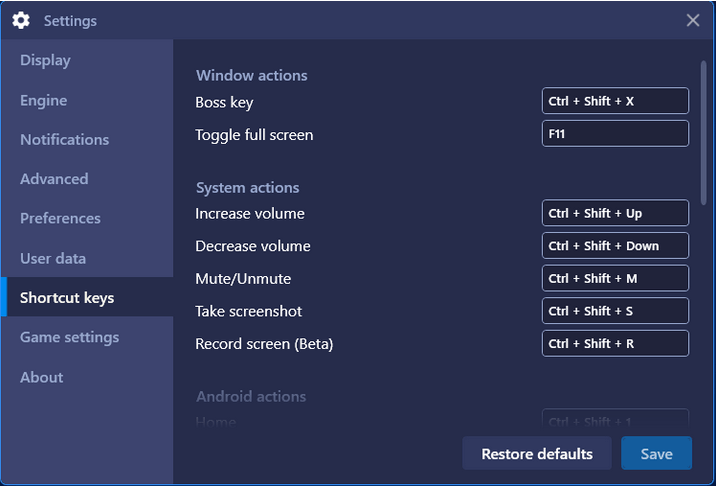
Hiện tại, người dùng BlueStacks có thể tạo phím tắt để truy cập/thực hiện các tác vụ nhất định bằng phím tắt thay vì dùng chuột tốn thời gian như trước. Các phím tắt này được xác định trước theo mặc định, công dụng của chúng cụ thể như sau:
Tác vụ cửa sổ
- Phím Boss key -
Ctrl+Shift+X(Ẩn/hiện BlueStacks) - Ghim cửa sổ lên đầu trang (Always on top) -
Ctrl+Shift+Z - Bật chế độ toàn màn hình -
F11
Tác vụ hệ thống
- Tăng âm lượng -
Ctrl+Shift+Up - Giảm âm lượng -
Ctrl+Shift+Down - Tắt/mở âm thanh -
Ctrl+Shift+M - Chụp ảnh màn hình -
Ctrl+Shift+S - Quay màn hình (thử nghiệm) -
Ctrl+Shift+R
Tác vụ Android
- Home -
Ctrl+Shift+1 - Quay lại -
Ctrl+Shift+2 - Rung -
Ctrl+Shift+3 - Xoay -
Ctrl+Shift+4
Điều khiển game
- Bật điều khiển game -
Ctrl+Shift+F10 - Mở cửa sổ điều khiển game -
Ctrl+Shift+H - Chế độ tự động chơi -
Ctrl+Shift+F - Ẩn/hiện lớp phủ cho phím bấm -
Ctrl+Shift+F6 - Khóa/mở khóa con trỏ -
Ctrl+Shift+F8 - Cửa sổ điều khiển gamepad -
Ctrl+Shift+G
Các phím tắt khác
- Mở thư mục media -
Ctrl+Shift+6 - Quản lý nhiều phiên bản -
Ctrl+Shift+8 - Thiết lập địa điểm -
Ctrl+Shift+K - Tự động biên dịch -
Ctrl+Shift+L
Người dùng có thể cập nhật phím tắt xác định trước qua Settings để phù hợp với cấu hình cá nhân.
Update BlueStacks lên phiên bản mới nhất
Bạn có thể update BlueStacks lên phiên bản mới hơn theo lích trình cập nhật hàng tháng. Tuy nhiên, nếu muốn update ngay lập tức hãy tải phiên bản mới nhất về máy qua website của hãng hoặc tại Download.com.vn hoặc click nút Update ở Settings.
Tinh chỉnh và thay đổi khác
- Giờ bạn có thể dùng cảm ứng hoặc stylus và cuộn qua App Center, Settings và các cửa sổ khác trên thiết bị cảm ứng.
- Giờ bạn có thể tạo chuỗi phím sử dụng UI có cửa sổ chỉnh sửa lớn hơn nhiều. Sao chép/dán và
Ctrl+Agiờ hoạt động mượt mà. - App Player đóng cực nhanh sau khi bạn nhấn nút Exit.
- Giờ bạn có thể chơi Ragnarok M mà không bị giật lag khi dùng chế độ Advanced Graphics Architecture GL.
- Chơi 캐치마인드 (com.netmarble.koongyacm) không còn bị lag màn hình.
- Giờ bạn có thể chơi Asphalt 9 không bị lag khi dùng chế độ GL danh nghĩa.
- Giờ bạn có thể chơi 테라 클래식 trên màn hình đồ họa phù hợp và đáng tin cậy ở chế độ DX.
Link Download BlueStacks chính:
BlueStacks 5.22.251.1002
Tải xuốngBạn có thể tải các phiên bản thích hợp khác dưới đây.
-
BlueStacks (mới nhất)
Download -
BlueStacks 5.22.210.1033 (.exe)
Download -
BlueStacks 5.22.168.1001 (.exe)
Download -
BlueStacks 5.22.153.1026
Download -
BlueStacks 5.22.102.1003
Download -
BlueStacks 5.22.85.1011
Download -
BlueStacks 5.22.51.1038
Download -
BlueStacks 5.21.661.1002
Download -
BlueStacks 5.21.580.1017
Download -
BlueStacks 5.21.150.1024
Download -
BlueStacks 5.21.111.1001
Download -
BlueStacks 5.12.102.1001
Download -
BlueStacks 5.11.42.1022
Download -
BlueStacks 5.11.41.1005
Download -
BlueStacks 5.11.40.1003
Download -
BlueStacks 5.11.20.1010
Download -
BlueStacks 5.11.1.1002
Download -
BlueStacks 5.10.10.1013
Download -
BlueStacks 5.9.600.1001
Download -
BlueStacks 5.9.300.1014
Download -
BlueStacks 5.20.0.1037
Download -
BlueStacks 5.13.0.1074
Download -
BlueStacks 5.9.0.1061
Download -
BlueStacks 5.8.101.1001
Download -
BlueStacks 5.7.0.1064
Download -
BlueStacks 5.6.110.1002
Download -
BlueStacks 5.5.120.1028
Download -
BlueStacks 5.5.10.1001
Download -
BlueStacks 5.4.100.1025
Download -
BlueStacks 5.3.145.1002
Download -
BlueStacks 5.2.110.1003
Download -
BlueStacks 5.2.0.1052
Download -
BlueStacks 5.1.100.1020
Download -
BlueStacks 5.1.0.1129
Download -
BlueStacks 5.0.110.1001
Download -
BlueStacks 5 5.0.100.1007
Download -
BlueStacks App Player 4.270.0.1053
Download -
BlueStacks App Player 4.260.0.1032
Download -
BlueStacks App Player 4.250.0.1070
Download -
BlueStacks App Player 4.240.20.1016
Download -
BlueStacks App Player 4.240.15.1005
Download -
BlueStacks App Player 4.230.10.1008
Download -
BlueStacks App Player 4.230.0.1103
Download -
BlueStacks App Player 4.220.0.1109
Download -
BlueStacks App Player 4.215.0.1019
Download -
BlueStacks 4.205.20.1001
Download -
BlueStacks 4.205.20.1001 (64-bit)
Download -
BlueStacks 4.205.20.1001
Download -
BlueStacks 4.205.0.1006
Download -
BlueStacks 4.205.0.1006 (64-bit)
Download -
BlueStacks 4.200.0.5201
Download -
BlueStacks 4.190.0.5002
Download -
BlueStacks 4.200.0.5201 (64-bit)
Download -
BlueStacks 4.190.0.5002 (64-bit)
Download -
BlueStacks 4.180.10.1006
Download -
BlueStacks 4.180.10.1006 (64-bit)
Download -
BlueStacks 4.180.0.1051
Download -
BlueStacks 4.180.0.1051 (64-bit)
Download -
BlueStacks 4.170.10.1001
Download -
BlueStacks 4.170.10.1001 (64-bit)
Download -
BlueStacks 4.170.0.1042
Download -
BlueStacks 4.170.0.1042 (64-bit)
Download -
BlueStacks 4.160.10.1119
Download -
BlueStacks 4.160.10.1119 (64-bit)
Download -
BlueStacks 4.150.11.1001
Download -
BlueStacks 4.150.11.1001 (64-bit)
Download -
BlueStacks 4.150.8.1008
Download -
BlueStacks 4.150.8.1008 (64-bit)
Download -
BlueStacks 4.150.0.1118
Download -
BlueStacks 4.150.0.1118 (64-bit)
Download -
BlueStacks 4.140.12.1002
Download -
BlueStacks 4.140.12.1002 (64-bit)
Download -
BlueStacks 4.140.11.1002
Download -
BlueStacks 4.140.11.1002 (64-bit)
Download -
BlueStacks 4.140.4.1002
Download -
BlueStacks 4.140.4.1002 (64-bit)
Download -
BlueStacks 4.140.2.1004
Download -
BlueStacks 4.140.2.1004 (64-bit)
Download -
BlueStacks 4.130.10.1003
Download -
BlueStacks 4.130.10.1003 (64-bit)
Download -
BlueStacks 4.130.1.1001
Download -
BlueStacks 4.130.1.1001 (64-bit)
Download -
BlueStacks 4.130.0.1049
Download -
BlueStacks 4.120.0.1081
Download -
BlueStacks 4.120.0.1081 (64-bit)
Download -
BlueStacks 4.110.0.1081
Download -
BlueStacks 4.100.20.1001
Download -
BlueStacks 4.100.1.1003
Download -
BlueStacks 4.90.0.1046
Download -
BlueStacks 4.80.0.1060
Download
Có thể bạn cũng quan tâm
-

VMLite Workstation
Chạy nhiều hệ điều hành trên máy tính cùng một thời điểm -
Microsoft Virtual PC 2007
Công cụ tạo máy ảo miễn phí -
Remix OS
Hệ điều hành Android trên máy tính -
Virtual CloneDrive
Tiện ích tạo ổ đĩa ảo miễn phí -
VMware Tools
Bộ tiện ích cải thiện hiệu suất & quản lý máy ảo -
Free Virtual Keyboard
Bàn phím ảo đa ngôn ngữ -
VisualBoyAdvance
Giả lập Gameboy Advance -
iPhone Simulator
Ứng dụng giả lập iPhone trên máy tính -
LDCloud
Trình giả lập Android trên nền tảng đám mây -
VMware Workstation Pro
Phần mềm tạo máy ảo MIỄN PHÍ