

































































 BlueStacks App Player 4.270.0.1053
BlueStacks 4.270.0.1053:
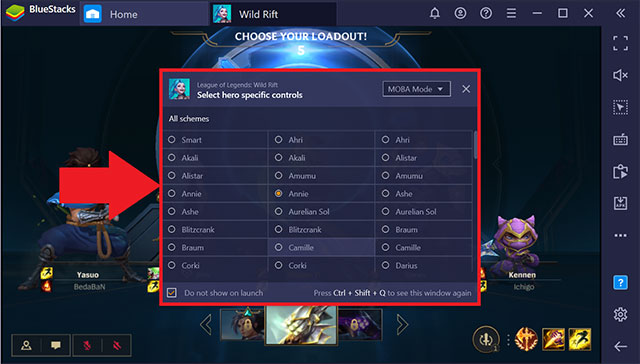
- Hệ thống điều khiển MOBA và WASD áp dụng cho từng anh hùng trong League of Legends: Wild Rift. Bạn có thể chọn từ:
- Hướng dẫn chơi game cải tiến
- Bộ chỉnh sửa hệ thống điều khiển
- Màn hình popup chọn kiểu điều khiển
(Để truy cập màn hình popup để chọn kiểu điều khiển, chỉ cần nhấn tổ hợp Ctrl + Shift + Q).
- Với độ phân giải cực rộng, bạn sẽ nhìn kẻ thù rõ hơn do đã được tăng khả năng quan sát, cho phép vô hiệu hóa đòn tấn công của chúng và kiểm soát tốt hơn tổ đội. Độ phân giải này hỗ trợ màn hình tỷ lệ 21:9, cho phép chơi LMHT Tốc Chiến tuyệt vời.
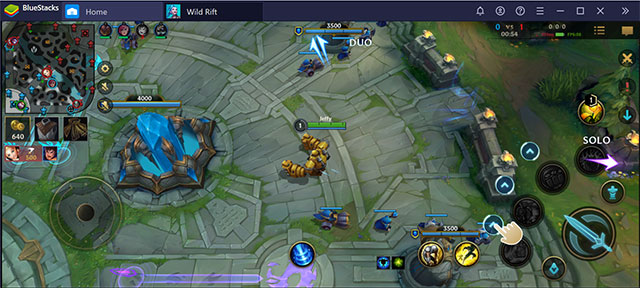
- Trong League of Legends: Wild Rift, game thủ có thể ngừng chuyển động của anh hùng khi tung đòn phép thuật hoặc tấn công bằng cách nhấn S trên bàn phím hoặc phím tùy chỉnh bất kỳ mà bạn đã chỉ định trong Game Guide. Thao tác này sẽ ngăn chặn nhân vật tiến về phía đích đã chọn và nhanh hơn cách click vào điểm bất kỳ để tránh chạy về hướng tấn công của kẻ thù.
- Tương tự như bản PC, bạn có thể dùng combo key để nâng cấp và tự động tung chiêu trong LMHT Tốc Chiến.
- Sửa lỗi Call of Duty: Mobile bị đóng băng hoặc treo gần xe tăng trong chế độ Battle Royale.
- Video và ảnh không bị lật khi bạn chụp hoặc upload lên Instagram.
- Tận hưởng 60FPS trong Free Fire.
- Không còn gặp lỗi trong Dragon Ball Legends.
- Cho phép chơi Golf King - World Tour ổn định trên BS.
- Sửa lỗi đồ họa trong game 검은강호2: 이터널 소울.
- Cho phép dùng camera trong SNOW với chế độ đồ họa nâng cao.
Link Download BlueStacks chính:
BlueStacks 5.22.251.1002
Tải xuốngBạn có thể tải các phiên bản thích hợp khác dưới đây.
-
BlueStacks (mới nhất)
Download -
BlueStacks 5.22.210.1033 (.exe)
Download -
BlueStacks 5.22.168.1001 (.exe)
Download -
BlueStacks 5.22.153.1026
Download -
BlueStacks 5.22.102.1003
Download -
BlueStacks 5.22.85.1011
Download -
BlueStacks 5.22.51.1038
Download -
BlueStacks 5.21.661.1002
Download -
BlueStacks 5.21.580.1017
Download -
BlueStacks 5.21.150.1024
Download -
BlueStacks 5.21.111.1001
Download -
BlueStacks 5.12.102.1001
Download -
BlueStacks 5.11.42.1022
Download -
BlueStacks 5.11.41.1005
Download -
BlueStacks 5.11.40.1003
Download -
BlueStacks 5.11.20.1010
Download -
BlueStacks 5.11.1.1002
Download -
BlueStacks 5.10.10.1013
Download -
BlueStacks 5.9.600.1001
Download -
BlueStacks 5.9.300.1014
Download -
BlueStacks 5.20.0.1037
Download -
BlueStacks 5.13.0.1074
Download -
BlueStacks 5.9.0.1061
Download -
BlueStacks 5.8.101.1001
Download -
BlueStacks 5.7.0.1064
Download -
BlueStacks 5.6.110.1002
Download -
BlueStacks 5.5.120.1028
Download -
BlueStacks 5.5.10.1001
Download -
BlueStacks 5.4.100.1025
Download -
BlueStacks 5.3.145.1002
Download -
BlueStacks 5.2.110.1003
Download -
BlueStacks 5.2.0.1052
Download -
BlueStacks 5.1.100.1020
Download -
BlueStacks 5.1.0.1129
Download -
BlueStacks 5.0.110.1001
Download -
BlueStacks 5 5.0.100.1007
Download -
BlueStacks App Player 4.270.0.1053
Download -
BlueStacks App Player 4.260.0.1032
Download -
BlueStacks App Player 4.250.0.1070
Download -
BlueStacks App Player 4.240.20.1016
Download -
BlueStacks App Player 4.240.15.1005
Download -
BlueStacks App Player 4.230.10.1008
Download -
BlueStacks App Player 4.230.0.1103
Download -
BlueStacks App Player 4.220.0.1109
Download -
BlueStacks App Player 4.215.0.1019
Download -
BlueStacks 4.205.20.1001
Download -
BlueStacks 4.205.20.1001 (64-bit)
Download -
BlueStacks 4.205.20.1001
Download -
BlueStacks 4.205.0.1006
Download -
BlueStacks 4.205.0.1006 (64-bit)
Download -
BlueStacks 4.200.0.5201
Download -
BlueStacks 4.190.0.5002
Download -
BlueStacks 4.200.0.5201 (64-bit)
Download -
BlueStacks 4.190.0.5002 (64-bit)
Download -
BlueStacks 4.180.10.1006
Download -
BlueStacks 4.180.10.1006 (64-bit)
Download -
BlueStacks 4.180.0.1051
Download -
BlueStacks 4.180.0.1051 (64-bit)
Download -
BlueStacks 4.170.10.1001
Download -
BlueStacks 4.170.10.1001 (64-bit)
Download -
BlueStacks 4.170.0.1042
Download -
BlueStacks 4.170.0.1042 (64-bit)
Download -
BlueStacks 4.160.10.1119
Download -
BlueStacks 4.160.10.1119 (64-bit)
Download -
BlueStacks 4.150.11.1001
Download -
BlueStacks 4.150.11.1001 (64-bit)
Download -
BlueStacks 4.150.8.1008
Download -
BlueStacks 4.150.8.1008 (64-bit)
Download -
BlueStacks 4.150.0.1118
Download -
BlueStacks 4.150.0.1118 (64-bit)
Download -
BlueStacks 4.140.12.1002
Download -
BlueStacks 4.140.12.1002 (64-bit)
Download -
BlueStacks 4.140.11.1002
Download -
BlueStacks 4.140.11.1002 (64-bit)
Download -
BlueStacks 4.140.4.1002
Download -
BlueStacks 4.140.4.1002 (64-bit)
Download -
BlueStacks 4.140.2.1004
Download -
BlueStacks 4.140.2.1004 (64-bit)
Download -
BlueStacks 4.130.10.1003
Download -
BlueStacks 4.130.10.1003 (64-bit)
Download -
BlueStacks 4.130.1.1001
Download -
BlueStacks 4.130.1.1001 (64-bit)
Download -
BlueStacks 4.130.0.1049
Download -
BlueStacks 4.120.0.1081
Download -
BlueStacks 4.120.0.1081 (64-bit)
Download -
BlueStacks 4.110.0.1081
Download -
BlueStacks 4.100.20.1001
Download -
BlueStacks 4.100.1.1003
Download -
BlueStacks 4.90.0.1046
Download -
BlueStacks 4.80.0.1060
Download
Có thể bạn cũng quan tâm
-

VMLite Workstation
Chạy nhiều hệ điều hành trên máy tính cùng một thời điểm -
Microsoft Virtual PC 2007
Công cụ tạo máy ảo miễn phí -
Remix OS
Hệ điều hành Android trên máy tính -
Virtual CloneDrive
Tiện ích tạo ổ đĩa ảo miễn phí -
VMware Tools
Bộ tiện ích cải thiện hiệu suất & quản lý máy ảo -
Free Virtual Keyboard
Bàn phím ảo đa ngôn ngữ -
VisualBoyAdvance
Giả lập Gameboy Advance -
iPhone Simulator
Ứng dụng giả lập iPhone trên máy tính -
LDCloud
Trình giả lập Android trên nền tảng đám mây -
VMware Workstation Pro
Phần mềm tạo máy ảo MIỄN PHÍ